TRANSCRIPT REUSE · HOOK STUDY
How to Turn an Instagram Transcript Into a Hook Study
Use the transcript as a review sheet, not as a script to copy: mark the opening promise, the first proof, the payoff, and the next action, then write a new brief from the pattern. This tool supplies spoken text and timed subtitle files; the hook analysis and original writing happen in your own notes.
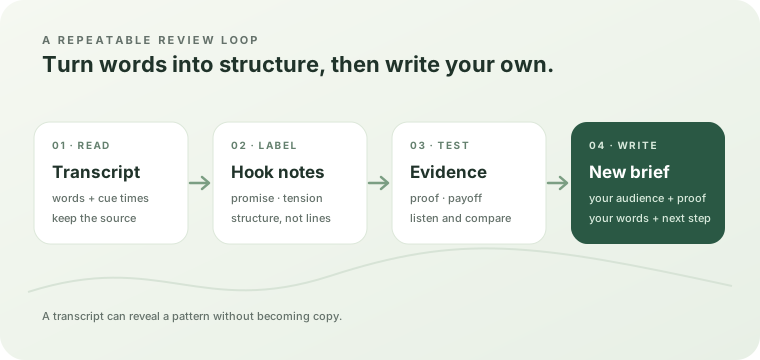
What a hook study is
A hook study asks how a short video earns attention in its first moments and how it delivers the promised payoff. It records structure: the question or tension at the start, the reason to keep watching, the proof that arrives, and the next action. It does not collect sentences for reuse.
Readable text makes that structure easier to compare. You can place several transcripts beside one another, underline the first promise, and notice whether the proof arrives before or after the explanation. The result is a pattern you can express in your own words.
The five-pass worksheet
- Capture the context. Save the public Reel link in your own notes, along with the niche, audience, and reason you selected it. This page does not keep a transcript history, so download or copy anything you want to review later.
- Mark the opening move. Read only the first spoken lines and label the move: a question, a surprising claim, a problem, a promise, or a scene that creates curiosity. Keep the label short; do not paste the line into your draft.
- Trace the payoff. Find where the speaker proves, demonstrates, explains, or resolves the opening promise. Note what changed between the start and the payoff. If the transcript is fragmented, listen to the source before deciding where one thought ends.
- Check the timing. Use timed subtitles to see when the hook starts and when the proof arrives. Timing is part of the pattern: a strong idea can feel late if the opening cue is long or the first payoff is delayed.
- Write a new brief. Turn the pattern into an audience, promise, evidence, sequence, and next action that fit your own subject. The new brief should stand on its own without the source Reel's wording, names, examples, or punchlines.
Use the right transcript output for each pass
| Review job | Useful output | What to record |
|---|---|---|
| Compare the spoken argument | Copy text or TXT | The opening move, proof, payoff, and repeated ideas in your own short labels. |
| Inspect when a line arrives | SRT or VTT | Start and end cue positions, pauses, and the point where the promise becomes concrete. |
| Prepare a captioned edit | SRT or VTT plus an editor | Words that need correction, cue boundaries, speaker changes, and meaningful sounds that still need a manual check. |
| Draft post copy | Copy text as a source | A separate post angle and call to action; a transcript is not promotional copy. |
What this tool gives you for a hook study
This section describes the current Reel Transcript Lab output so the worksheet stays tied to a repeatable workflow rather than a generic transcript promise.
- The input is one public Instagram video link. The page validates a complete HTTPS Reel, video-post, TV, or supported share path, then sends the cleaned link to its same-origin transcript route. A profile or Story link is stopped before a provider request starts.
- The result is built from returned segments. The browser requires a content list and reads each segment's text, start offset, and duration. It joins the nonblank segment text for the readable transcript while keeping the timing fields for subtitle exports.
- Copy and TXT are the untimed reading path. The copy action and TXT formatter join the segment words without cue numbers or timecodes. Use this view to label the opening move and payoff without treating line wrapping as a timing signal.
- SRT and VTT carry the same words with cue timing. SRT adds cue numbers and comma-separated millisecond timecodes. VTT starts with a
WEBVTTheader and uses period-separated timecodes. Both derive the cue end from the segment's start offset plus duration. - The exporter does not write the brief for you. There is no hook classifier, summary writer, speaker-label pass, or post-caption generator in this workflow. The useful analysis is the note you make after comparing the text and timing.
- An empty result has a defined boundary. If the returned segments contain no nonblank words, the page shows “No speech was found in this video.” That message means the returned transcript has no words; listen to the Reel before deciding whether the audio is silent, music-only, or simply unavailable to the provider.
- Keep the source and the study separate. Download the file you reviewed, keep your labels in a separate worksheet, and write your own examples. The site does not save a history after you leave or reload the page.
These checks make the workflow reproducible: the same transcript can be opened as readable text, inspected as timed cues, and then converted into notes without pretending that a download is already a finished video or a ready-made content brief.
A comparison table that protects originality
| Field | Reel A | Reel B | Reel C |
|---|---|---|---|
| Audience problem | Write your label | Write your label | Write your label |
| Opening move | Question, claim, scene, or promise | Question, claim, scene, or promise | Question, claim, scene, or promise |
| Proof arrives | Before / during / after explanation | Before / during / after explanation | Before / during / after explanation |
| Payoff shape | Result, rule, demonstration, or warning | Result, rule, demonstration, or warning | Result, rule, demonstration, or warning |
| Transferable pattern | Describe the structure, not the line | Describe the structure, not the line | Describe the structure, not the line |
Fill the last row only after you have compared more than one example. “Starts with a question, then shows proof” is a pattern. “Use this exact question” is a copy instruction. Keep those two outputs separate.
Turn the pattern into an original brief
Write the brief in this order: audience → problem → promise → proof → sequence → next action. Give each field one sentence. If you cannot state the proof without referring to the source Reel, the study is not finished yet.
- Audience: Who needs this explanation now?
- Problem: What visible friction or question starts the video?
- Promise: What will the viewer understand or be able to do?
- Proof: What test, example, demonstration, or before/after evidence will you supply?
- Sequence: In what order will the viewer see the idea, evidence, and limitation?
- Next action: What is the smallest useful step after the video?
Use the source transcript to check whether your structure is clear, then close it while drafting. Listen to your own recording or read your own script aloud before publishing. A hook study should make your next explanation more specific, not make two videos sound alike.
Keep captions and on-screen words in their own check
A spoken transcript is not the same as words permanently printed in the picture, and neither is automatically a complete accessibility caption track. W3C guidance describes captions as synchronized text for audio that can also identify speakers and meaningful non-speech sounds. This tool returns recognized speech segments; it does not add those labels or describe every sound.
If the Reel relies on text cards, names, or visual demonstrations, make a second visual pass against the video. If you need a captioned video, import SRT or VTT into an editor, correct the text and cue timing, add the details viewers need, and watch the exported version.
Frequently asked questions
Does the tool generate a hook for me?
No. It returns the transcript and subtitle files. The worksheet above turns the transcript into a structural note, and you write the new hook in your own words.
Can I study several public Reels?
Yes, one public video link at a time. Keep your comparison table outside the page because this tool does not save a history.
Should I use TXT, SRT, or VTT for the first pass?
Use copy or TXT to read and label the argument. Use SRT or VTT when the timing of the opening and payoff matters or when a subtitle editor is your next step.
What if the Reel contains words on screen but little speech?
The transcript path may have no words to return. Check the existing on-screen words guide, then review the picture separately instead of treating visible text as spoken transcript output.
What if the provider returns no speech?
Read the exact message and follow the recovery steps in the troubleshooting guide. A valid link is not proof that the provider can retrieve or recognize its audio.