LINK CHECK · TRANSCRIBE INSTAGRAM VIDEO
Transcribe Instagram Video: Which Link Should You Paste?
To transcribe an Instagram video here, paste the complete HTTPS link of the public video itself. The page checks Reel, video-post, TV, and supported share-link paths, removes tracking text, and then sends the cleaned URL for transcription. A profile, Story, insecure URL, or link with credentials is rejected before a transcription request starts.
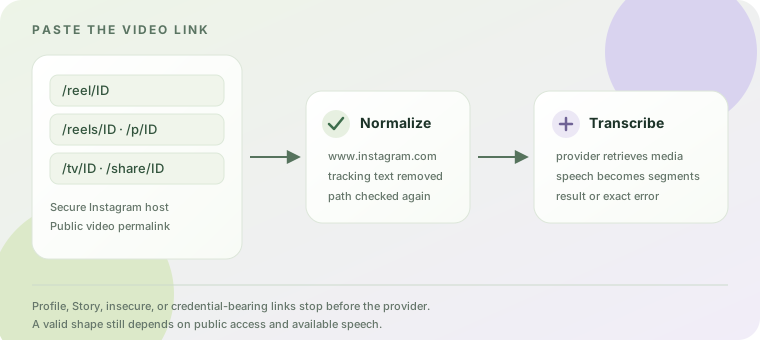
Start with the video's permalink
Open the individual Reel or video post in Instagram and copy its link. Do not start with a profile, a collection, a Story, or an embed URL. A link can look public in a browser and still be unavailable to a transcription provider, so this page checks the URL shape first and the media access second.
The accepted shapes below describe the current browser validator. They are a contract for what the input field will accept, not a promise that every public post can be retrieved.
| Link shape | What the page checks | What to do |
|---|---|---|
/reel/ID | Accepted as a Reel path on Instagram's secure host. | Copy the Reel's own share link and paste it as-is. |
/reels/ID | Accepted as the plural Reel path. | Use the video permalink, not the creator's profile URL. |
/p/ID | Accepted as a video-post path. The post still has to contain retrievable video and speech. | If it is a photo or a restricted post, choose the actual public video instead. |
/tv/ID | Accepted as an Instagram TV-style video path. | Keep the complete HTTPS path when copying it. |
/share/ID, /share/reel/ID, or /share/p/ID | Accepted by the input validator as share-link forms. | If the provider cannot retrieve the shared form, reopen the video and copy its canonical Reel or post link. |
What happens to the link before transcription
This section describes the current Reel Transcript Lab implementation so you can diagnose the exact handoff rather than guess what a generic Instagram transcript tool might do.
- Protocol and host are checked first. The browser requires
https:and one ofinstagram.com,www.instagram.com, orm.instagram.com. Usernames, passwords, and non-default ports are rejected. This prevents a pasted address from silently pointing somewhere else. - The path is checked against video forms. The validator accepts the five path families above. A profile path or a Story path produces the message
Use a Reel, video post, or share link, not a profile or Story.
Nothing is sent to the provider for that input. - The URL is normalized. The page changes the host to
www.instagram.comand removes the query string and fragment. Tracking text such as?utm_source=...is not part of the URL sent onward. - The server applies the same boundary. The Worker re-checks the secure Instagram host and the
/reel/,/reels/,/p/,/tv/, and/share/path pattern before calling the transcription provider. A browser that accepts a value does not bypass the server check. - Only then does the provider receive the link. The request uses the cleaned URL with automatic transcript mode. The page may show a queued or processing state while the provider works; keep the tab open until the result or an error is shown.
The page's URL normalization and the server's second check are both repeatable from the public source. They explain why copying the exact video permalink is more useful than repeatedly pasting a profile or a shortened redirect.
What the request path can prove
- The browser calls the same origin with the normalized URL; it does not send your Instagram password or ask for an Instagram login.
- The server requires the page's request marker and same-origin request before it contacts the provider. A random cross-site caller cannot use the transcript route as a public proxy.
- The first request asks for automatic transcript mode. If the provider returns a job identifier, the page polls that identifier and shows queued or active status instead of pretending the text is ready.
- The browser gives a request two minutes to reach the API call, while a provider fetch on the Worker has its own 110-second abort window. A later provider timeout is therefore an observable failure state, not an empty transcript that the page silently invents.
- When a completed response contains segments, the page joins their text for the visible transcript and keeps the segment start and end offsets for SRT and VTT downloads. A URL check never changes that output contract.
These details are useful when a link looks correct but the result does not appear: first decide whether the failure happened before the provider handoff, during retrieval, or after a queued job. That is a more reliable next step than changing a valid path to a different spelling.
Match the validation message to the next action
| Message | Meaning at the link stage | Next action |
|---|---|---|
| “Paste a public Instagram Reel, video post, or share link to continue.” | The field is empty. | Copy the individual public video link from Instagram and paste it into the field. |
| “Paste a complete Instagram Reel, video post, or share link.” | The text is not a complete URL that the browser can parse. | Copy the full address again; include https://. |
| “Use an https://www.instagram.com link.” | The scheme, host, credentials, or port are outside this page's input contract. | Use the secure Instagram permalink and remove copied login or proxy information. |
| “Use a Reel, video post, or share link, not a profile or Story.” | The host is Instagram, but the path does not identify one of the accepted video forms. | Open the actual video, use its share action, and paste that link. |
A valid shape can still fail at retrieval
Passing the URL check only means the page can make a well-formed request. The provider can still return that the video was not found or is not publicly accessible, that it could not transcribe the video, or that capacity is temporarily unavailable. A public URL is not a guarantee that the media can be fetched.
Supadata's published Transcript Unavailable explanation says a video may have no captions or subtitles available. This page uses automatic transcript mode, but it cannot add speech that the provider cannot retrieve. If the link is valid, try the original Reel or video-post permalink once; if the same provider error remains, keep the exact message for support rather than changing the URL at random.
For a longer message-to-action map covering access errors, empty speech, capacity, and timeouts, read Why a public Instagram Reel can still fail to transcribe.
Five steps before you submit
- Open the specific public video, not the account page.
- Use Instagram's share control to copy the link.
- Check that the pasted text begins with
https://and uses an Instagram host. - Submit once and keep the tab open while the status changes.
- If the provider fails, save the exact message and retry the canonical Reel or post link once.
Frequently asked questions
Can I use an Instagram profile URL?
No. A profile does not identify one video, so the browser rejects it before the provider is called. Open a specific Reel or video post and copy that permalink.
Are Instagram share links accepted?
The input validator accepts the three share-link path forms listed above. Provider retrieval is a separate step. If a share form fails after submission, use the canonical Reel or video-post link copied from the opened video.
Does a /p/ link always mean the post can be transcribed?
No. The path passes the link check, but a photo-only, removed, restricted, or speech-free post may still produce no transcript.
Why are tracking parameters removed?
The page strips the query string and fragment before sending the request. That keeps copied campaign text or a browser fragment from changing the media URL being checked.